Versioned prototypes
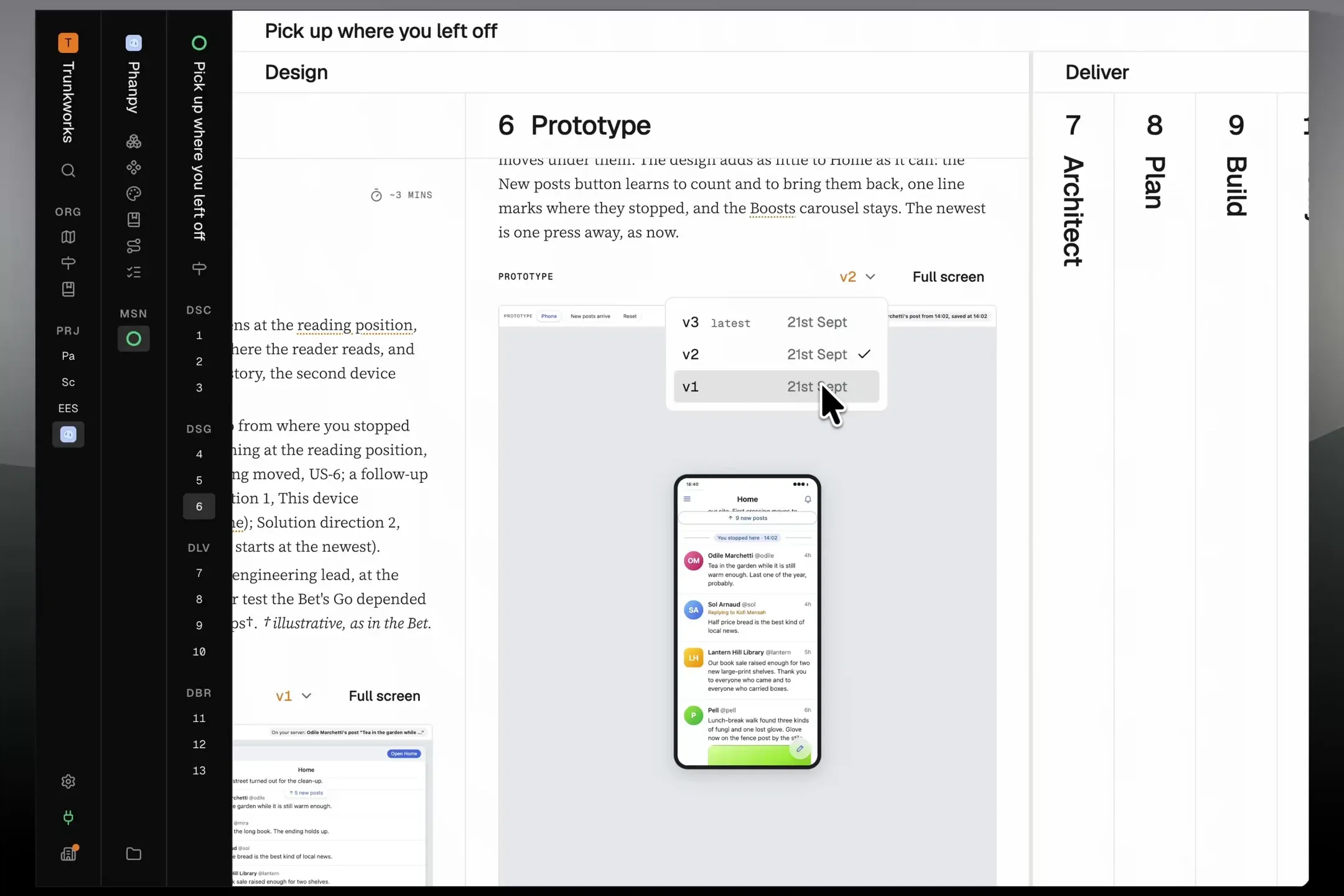
Each round of feedback now makes a new version of the same prototype, not another copy in a growing document.
- Switch versions from the menu in the prototype’s header, and see at a glance when you’re not on the latest.
- Make comments right where the prototype sits in the document.
- A mission with many rounds of prototype feedback now loads as fast as one with a single round.
Single process page
Skills and Templates are now one page: Process.
- Pathfinder’s core templates and skills in one group, and yours in another.
- Duplicate one of Pathfinder’s templates or skills to customise it.
- A running mission keeps the skills it started with, so nothing changes under you halfway through.
Streamlined template
The Product feature template’s skills are now shorter, clearer, and more consistent.
- Your agent reads only the documents it needs, instead of every one.
- Every document shows how long it takes to read, and each approval shows who gave it and when.
Improvements
- Mission and phase names stay in view as you scroll sideways, on slimmer bars that leave more room for the stage you’re reading.
- Interactive prototypes sit right under each document’s overview.
- Pathfinder uses Geist on every device, so Windows and Android look the way the app was designed.
- Your agent reads one part of a long document or design.
- Comparing versions loads faster and keeps your place.
- Your agent can read and add to the glossary outside a mission.
- A mission links to the exact version of the process it ran.
- Build work that reads the same code goes to one agent, and agents working in parallel each get their own copy of the code.
- Planning a change to what people can do with existing data starts with a table of every state and action.
- At the end of a mission, lessons for every team go to Pathfinder and lessons for your project stay with it. Your project’s docs update once the code has merged.
- Before, Diff and After work the same way on templates, skills and architecture.
- A template’s stage shows its whole skill, with its extra files folding out beside it.
- Dependency updates wait a few days after a release, and the code scan catches the mistakes coding agents leave behind.
- Joining by invitation with a password confirms your email address first.
- Small icon buttons are slimmer, and holding one shows its name.
- Every title and stage number is one size.
- The legal pages match the rest of the site.
Fixes
- Leaving an organization ends your access to it straight away.
- Stage names are no longer cut short on Windows or in Firefox.
- Japanese, Chinese and other input methods put text where you typed it.
- Saving a document again updates it, instead of making a second copy.
- Switching between templates no longer shows an error.
- Prototypes no longer stay blank in Paradev’s browser.
- Undoing changes to a skill no longer leaves a moved file stuck.
- A copied skill uses its new name throughout.
- Opening a runbook right after searching works the first time.
- On a phone, a diagram’s controls show the full name of what you’re looking at.
- On a phone, a skill’s toolbar stays on screen as you scroll.
- Pressing Escape on a term’s card keeps your place.
- Stage numbers and names no longer jump as stages fold, and the text cursor no longer flickers across titles.
- Project logos no longer flash at full size while a page loads.
- The example mission’s template link opens the template with its stages.