See where your complexity lives
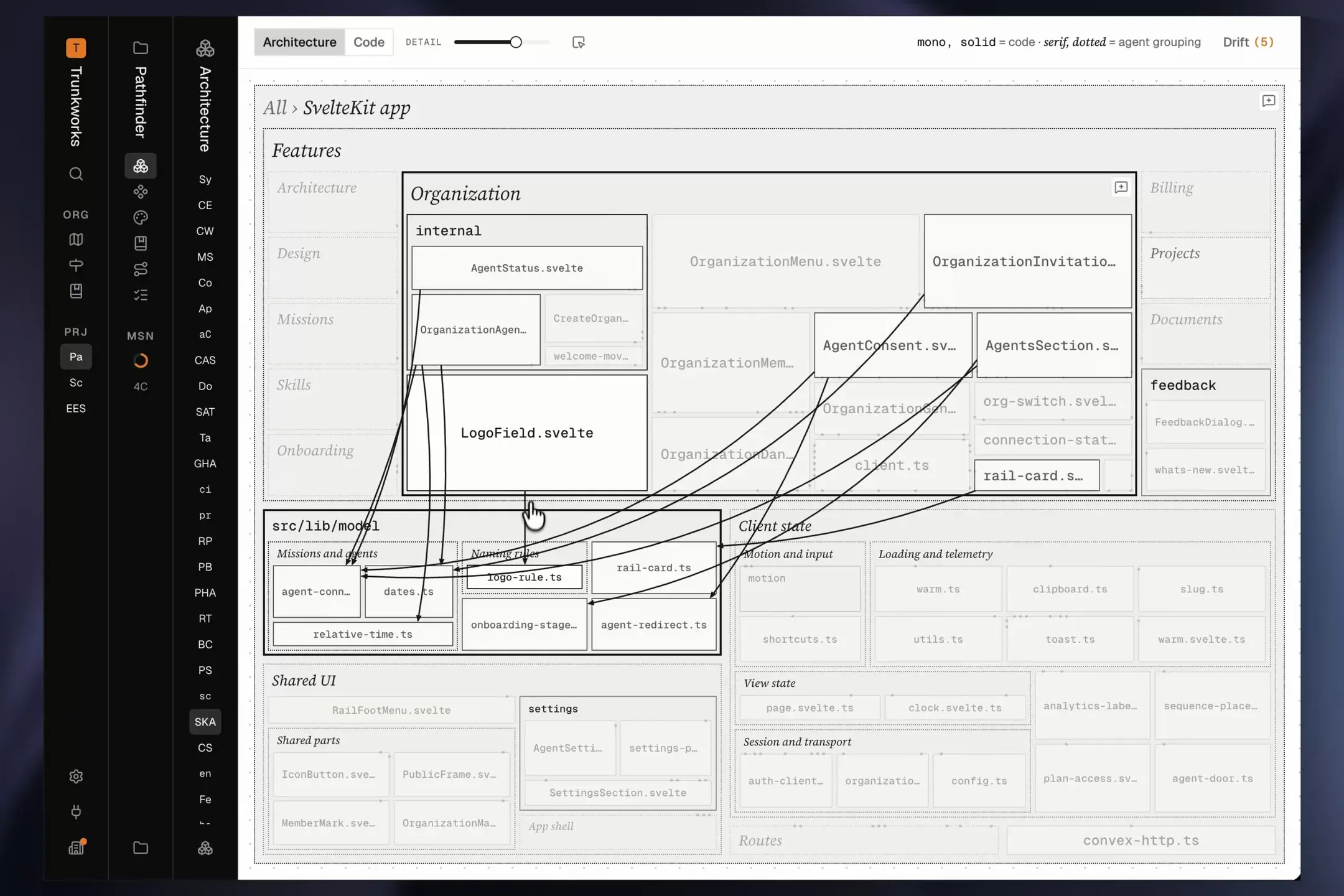
Pathfinder’s architecture diagrams now show the size of your project’s code, and let you explore how the modules connect to each other.
- Every box is sized by the code that module holds, so the biggest parts of your product stand out.
- Press a box to see every module wired to it, so you can see at a glance how tangled each part is.
Detail levels
Each detail level opens one more level of nesting, from your system down to single files. Choose the detail level to match your task. Explaining your system to a new teammate? Low detail. Exploring a module whose complexity you’re trying to tame? High detail.
Code view
Your agent draws your Architecture so your system is easy to understand, and its agent groupings, boxes it drew rather than folders in your code, show how the parts fit together. But your product’s real architecture is its code. Switch to Code to see only your folders and files, laid out the same way.
- Size boxes by how much code they hold, or by how often they’re imported, counting Convex calls as imports.
- Switching keeps your zoom and selection, so you can hold the agent’s picture up against the code.
Improvements
- On a narrow screen, the diagram’s controls fold into one menu instead of running off the bar.
- A project’s architecture now holds up to 4,000 modules and files.
- Your tables are read straight from your schema on every refresh, so the diagram never misses one or keeps one you deleted.
- Your architecture’s history starts at its first revision, and every mission’s old diagrams still draw.
- Your agent can make several edits to a document or skill in one call, saved as one revision.
- Your agent can download any version of a prototype and open it in its own browser.
- Your agent sees how a module connects to the rest of the system, and can read several levels in one call.
- Your agent sees how many boxes the diagram can draw, and a change over the limit says what to remove.
- Agents in auto mode are no longer stopped from saving to Pathfinder.
- Exploring ideas starts from what your product already does, and each idea’s summary leads with the idea itself.
- Your agent’s guide to documenting a project is shorter, and starts a component capture when a project has none.
- A prototype captured from a running app keeps all its states.
Fixes
- On an iPhone, the live app at the top of the home page walks through its pages again, and the app beside the story follows you as you scroll.
- Clicking “Try the live app” on the home page lets you use the app, instead of the frame flashing and letting go.
- A prototype no longer goes blank when you edit the text around it, and keeps whatever you did in it.
- Adding a comment no longer sends a prototype back to its first screen, and a comment opens on the screen it was left on.
- A prototype whose image or font never arrives draws without it, instead of staying blank.
- A mission shows “Agent working” only while an agent is working on it.
- An agent whose session began before a release is told to reconnect, instead of being refused with no way forward.
- Capturing components now also finds them in a React app served by Vite.
- Uploading components no longer stops after a release: the capture scripts update themselves and ask to be run again.
- The Components page’s prompt captures your components, not only your project’s documentation.