Level up your agentic engineering
Practices and Runbooks have both been rebuilt from the ground up.
Practices show you, your team and your agents what world-class agentic product engineering looks like, and how much of it you’re already doing. Runbooks teach your agents to work effectively with each project, exactly the way you would.
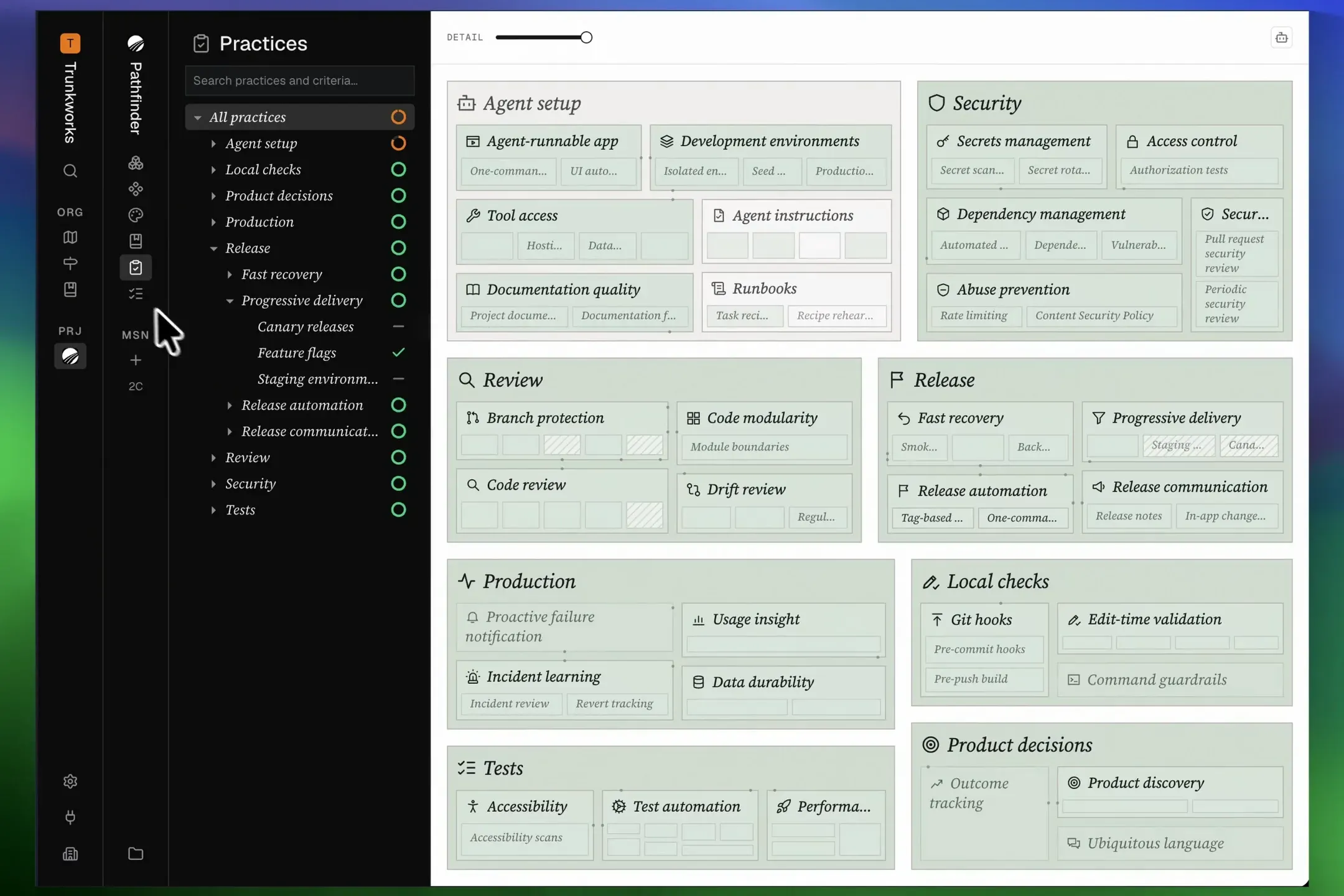
Practices
Practices are an explorable map of every discipline and practice needed for world-class agentic product engineering. Each practice goes green when your project already has in place.
Can your agents spin up an isolated environment for each new feature or fix as they build it? Have you added hooks to give your agents type, lint, and test feedback on every change they make to your code? Do you have automated unit, integration, property-based, and end-to-end tests? Are you correctly managing your project’s secrets? Do you track the outcome of your product decisions?
For any practice that you’re currently not following, just copy the prompt from the map, and ask your agent to build the practice into your project.
Runbooks
Great engineering teams write runbooks for the work they repeat. At 2 am, mid-outage, you don’t want to guess how to roll back production. You want to follow the exact steps that your team’s database expert wrote. Now you can keep those runbooks in Pathfinder, and your agents follow the same steps.
Each runbook says when the work is done, what to check before you start, what to expect, and when to stop and ask. Your agent records every run, so you can see which runbooks are working perfectly and which need to be re-run.
If you’re not using runbooks yet, don’t worry, Pathfinder will guide you. Just copy the prompt on the page’s empty state, and your agent writes a first draft of each runbook that makes sense for your product. Then you can improve them with your agent from there.
Zoom to focus
Double-click a box on an Architecture or Practices diagram to fill the diagram with it. Follow the breadcrumbs back to where you were.
Bring your OpenSpec project
Your agent can bring an OpenSpec project into Pathfinder, every change as a mission and every spec as a document. It shows you the plan, and what the import can’t carry, before it writes anything.
Skills
write-agents-mdis new: your agent writes and audits your project’s AGENTS.md files, so every coding agent reads them.import-openspecis new: it brings an OpenSpec project into Pathfinder.use-pathfinderhas your agent read the runbook for a recurring task before it starts, and record the run when it’s done.document-projectswrites runbooks in the new shape, and says which documents keep their format and how one moves.- The Product feature stages follow your runbooks for the work they repeat, and link the practices they talk about.
capture-componentsgives each component its purpose, from the component’s own code comment.
Improvements
- Press a practice to see what it builds on beside it, and each missing criterion says why it matters.
- A file named as evidence for a practice links to its place in your architecture, with the same preview a document shows.
- Practices read in the same words everywhere: each is graded by its criteria, as Implemented, Partly implemented, Missing, Not done by choice or Not graded.
- A project that hasn’t been graded yet shows one prompt to grade it.
- On a phone, Practices opens on the disciplines, and a practice too small for its name shows its icon.
- The Agent instructions practice asks for an instruction audit each time your agent moves to a new model, and catches a rule that points at a file that moved.
- Disciplines and their runbooks are listed in alphabetical order, and runbooks no discipline fits are grouped under Miscellaneous.
- A line between two boxes now means one thing: that one uses the other, read straight from your code.
- Wires rest as small dots on the edges of the boxes they join, and pointing at a box draws its own. They leave from the sides that face each other, curve gently, and end in solid arrowheads in their wire’s colour.
- In the Code view, wires follow the detail level down into folders and files.
- The Detail slider is yours: it opens only what you ask for, stays put when you switch between Architecture and Code, and 1, 2, 3 pick a level. With a box chosen, the boxes that use it open too.
- Boxes pop in and out as you change the detail. The Size and Wires menus are gone: every box is sized by its lines of code.
- The diagrams stand on a plain background, boxes step darker the deeper they sit, and the space between them shrinks with each level, so what holds what reads at a glance.
- The switch between Architecture and Code is two icons, and it stays in place when the Detail slider comes and goes.
- The Drift panel’s top button copies a prompt to fix drift with your agent, one row at a time, and each row’s button fixes that one gap.
- A glossary row in Drift shows the name the file uses beside the name the glossary uses, and Drift no longer lists a file whose name only shares a word with a term.
- A folded Practices, Architecture, Components or Process rail keeps its top level, so it still reads as a map.
- Your agent reads runbooks, components, the design document and the architecture whole when they’re small, and picks the parts its task needs from an index when they’re large.
- Your agent knows Pathfinder’s general skills, such as write-decision-matrix and review-code, outside a mission too.
- Your agent can move a project document between Markdown and HTML, keeping every earlier version.
- Asking for the outline of a document with no headings tells your agent to read it whole, instead of answering an empty list.
- Your agent asks for a new mission’s name rather than its address, and Diverge no longer asks you to confirm what you approved a stage earlier.
- The heading of the panel under the diagram, for the tour and Changes, is one size smaller.
- The architecture example on the home page opens at its most detailed level.
Fixes
- Approving a stage no longer folds it shut while you read it, and the page moves to the stage that opens next.
- Scrolling a document no longer gets stuck on a prototype in it. Open the prototype full screen to scroll inside it.
- A mostly vertical trackpad scroll over a prototype no longer drifts sideways.
- A single click anywhere along the Detail slider moves it, and moving it quickly back and forth no longer leaves boxes invisible.
- On Practices, the Detail slider appears with the diagram, instead of seconds after it on a busy page.
- A new comment opens beside the button you pressed, titled in the box’s own type, and pressing the button again puts it away.
- Moving between boxes no longer flashes every wire of the box they sit in.
- Pointing at a box draws every connection it has, even where the diagram at rest shows none starting inside it.
- A box too short to show what it holds shows its name on one line instead of going blank, and a box too small for its name shows its wires on hover.
- A small unnamed box lights its edge under the pointer, so it reads as something to press.
- A maximized box has the same 16px margin as the whole diagram.
- A practice’s name stays inside its box, on Linux too, and runs down a tall box with its icon turned to match.
- A screen reader names each practice by its title and says whether it’s complete, including boxes too small to show their name.
- The Back button in a panel’s heading stands 16px from the edge, like the buttons at the other end.